> For the complete documentation index, see [llms.txt](https://integrations.impact.com/llms.txt). Markdown versions of documentation pages are available by appending `.md` to page URLs; this page is available as [Markdown](https://integrations.impact.com/integration-guides/for-brands/plugin-integrations/e-commerce/integrate-with-ecwid.md).
# Integrate with Ecwid
Ecwid by Lightspeed is an ecommerce platform that helps small and medium-sized businesses to easily create a bold, easy-to-use online store and start selling online or in-person. The impact.com and Ecwid plugin app integrates impact.com ‘s conversion tracking and reporting with your Ecwid store. The integration is done via a no-code plugin, meaning you can integrate and end-to-end test without needing web development expertise.
{% hint style="success" %}
**Note:** Integrating with Ecwid is still in beta**.**
{% endhint %}
## Requirements
* **One (1)** [**Event Type**](https://help.impact.com/brand/what-would-you-like-to-learn-about/platform-features/event-types/create-an-event-type) tracking online sales (no recurring subscriptions).
* A **storefront** that is hosted by Ecwid or has at least one basic Ecwid widget.
* Not sure if your site is compatible? Get a [list of all Ecwid widgets on your page](https://github.com/Ecwid/ecwid-api-docs/blob/master/includes/_jsapi.md#ecwidgetinitializedwidgets) or [contact support](https://app.impact.com/support/portal.ihtml?createTicket=true) for help.
You must configure [Automated Reversals](https://help.impact.com/brand/what-would-you-like-to-learn-about/platform-features/actions-and-payouts/payouts/approve-reverse-and-modify-pending-payouts-for-actions#automate-returns-processing) separately to ensure they function correctly within your integration.
## Add impact.com to Ecwid
This instruction set covers installing the impact.com app to your Ecwid store.
### Install impact.com's plugin
1. Access this [link](https://www.ecwid.com/apps/featured/impact-com) and select **Get** and then **Install**.
2. On the *impact.com Settings* screen, fill in the relevant account data. Refer to your account data below to easily retrieve this information.
Field
Description
Program ID *
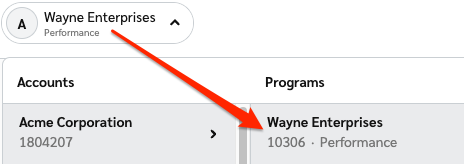
In the impact.com platform, select your brand name in the top-left corner. Your Program ID is the numerical value under the program name.
3. Select **Save**. You'll receive confirmation that impact.com has been installed to your Ecwid store, after which you can begin end-to-end testing.
Once you have fully integrated the impact.com API, you can begin end-to-end testing to ensure everything is working properly. Learn how to proceed with [End-to-End Testing](/integration-guides/end-to-end-tests.md).
## Troubleshooting
My test conversion isn't appearing in impact.com
If your test conversion isn't appearing, check the following:
* You've waited at least 30 minutes since the test conversion occurred in your Ecwid store. Conversion reporting can take up to 2-4 hours during peak times — consider checking back later in a few hours.
* Your Event Type ID in Ecwid *exactly matches* the Event Type ID in impact.com.
* [Use the OrderId (OID) Lookup tool](https://help.impact.com/brand/what-would-you-like-to-learn-about/platform-features/multi-program-reports/orderid-lookup-report) to search for the Ecwid Order ID of the test order.
---
# Agent Instructions
This documentation is published with GitBook. GitBook is the documentation platform designed so that both humans and AI agents can read, navigate, and reason over technical content effectively. Learn more at gitbook.com.
## Querying This Documentation
If you need additional information that is not directly available in this page, you can query the documentation by asking a question.
Perform an HTTP GET request on the following URL with the `ask` and `goal` query parameters:
```
GET https://integrations.impact.com/integration-guides/for-brands/plugin-integrations/e-commerce/integrate-with-ecwid.md?ask=&goal=
```
`ask` is the immediate question: it should be specific, self-contained, and written in natural language.
`goal` is what the user is ultimately trying to achieve, the reason they need the answer. Sharing it helps GitBook give you a better, more relevant answer. A goal is most helpful when it describes the outcome the user wants rather than restating the question. For example, with `ask=how do I create an API token`, a goal like `automate deployments from our CI pipeline` lets GitBook tailor the answer to that use case.
The response will contain a direct answer to the question and relevant excerpts and sources from the documentation.
Use this mechanism when the answer is not explicitly present in the current page, you need clarification or additional context, or you want to retrieve related documentation sections.