# Integrate with Shoplazza

The [impact.com Affiliate & Influencer](https://shoplazza.app/detail/32607/) app in Shoplazza integrates impact.com's conversion tracking & reporting with your Shoplazza store. Our app is a no-code plugin, meaning you can integrate and end-to-end test without needing web development expertise.

{% hint style="success" %}
**Note:** Our impact.com integration with Shoplazza is currently in beta. Should your experience not match the guide below, please reach out to your CSM (or [contact support](https://app.impact.com/support/portal.ihtml?createTicket=true)).
{% endhint %}

This guide covers…

* A check that needs to be performed before integrating.
* How to install the impact.com plugin to your Shoplazza store.
* Full end-to-end conversion testing in your store.

### Check before integrating

Before proceeding with the Shoplazza integration, ensure you have:

* Access to your impact.com account
* Admin access to your Shoplazza store
* Your impact.com account credentials ready

### Understand the integration limitations

* Shoplazza releases new API versions every six months, and each version supports at least 12 months. If your application calls a version that is no longer supported, it will return a 404 status when calling the request.
* To embed the app, you must [contact support](https://app.impact.com/secure/advertiser/support/customer-support-portal-flow.ihtml?).
* You cannot insert meta-tags to the orders, only to the products.
* Shoplazza does not provide support for knowing when a user uninstalls the app.

{% hint style="info" %}
**Refunds:** Shoplazza does not provide information about the number of items refunded but only the amount of revenue refunded. Reach out to your CSM (or [contact support](https://app.impact.com/support/portal.ihtml?createTicket=true)) to enquire about the best way forward regarding refunds for your store.
{% endhint %}

## Add impact.com to Shoplazza

***

This instruction set covers installing *impact.com Affiliate & Influencer* to your Shoplazza store.

### Install impact.com's plugin

1. In Shoplazza, log into your account and navigate to the [*impact.com Affiliate & Influencer*](https://shoplazza.app/detail/32607/) app.

<div data-with-frame="true"><figure><img src="/files/hoUvkgPpqX6IfefiV3GQ" alt="" width="563"><figcaption></figcaption></figure></div>

2. Select **Add** and confirm that you would like to install the app.
3. On the *Existing or New Customer* screen, under *Existing Customer*, select **click here to set up the integration**.

<div data-with-frame="true"><figure><img src="/files/2KNZKgs98BwVbG4tABIQ" alt="" width="563"><figcaption></figcaption></figure></div>

4. On the following screen, fill in your relevant account data. Continue with the instructions below to access your *Universal Tracking Tag*.

* See the table below for more information on how to access your account data.
* **Refer to your&#x20;*****Program Elements*****&#x20;document for your specific account information**.

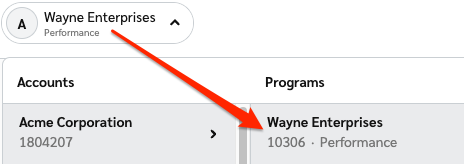
<table><thead><tr><th width="279.015625">Field</th><th>Description</th></tr></thead><tbody><tr><td>Impact Account SID *</td><td>In the impact.com platform, navigate to <img src="/files/qPLiENtq33ewHc3tmEP4" alt=""> <strong>[User profile] → Settings →</strong> <a href="https://app.impact.com/secure/advertiser/api/fr/api-access-tokens-ui.ihtml"><strong>API</strong></a> and copy your Account SID.</td></tr><tr><td>Auth Token *</td><td>In the impact.com platform, navigate to <img src="/files/qPLiENtq33ewHc3tmEP4" alt=""> <strong>[User profile] → Settings →</strong> <a href="https://app.impact.com/secure/advertiser/api/fr/api-access-tokens-ui.ihtml"><strong>API</strong></a> and copy your Auth Token.</td></tr><tr><td>Program ID *</td><td><p>In the impact.com platform, select your brand name in the top-left corner. Your <strong>Program ID</strong> is the numerical value under the program name.</p><p></p><p><img src="https://files.readme.io/2edc9a646ec0744579c7d80854773dc742f408e01c48224be1fb9756c4d524f0-program_id.png" alt="Program ID screenshot"></p></td></tr><tr><td>Sale/Subscription Tracker *</td><td>In the impact.com platform, navigate to <img src="/files/qPLiENtq33ewHc3tmEP4" alt=""> <strong>[User profile] → Settings →</strong> <a href="https://app.impact.com/secure/advertiser/tracking-settings/actiontracker/view-actiontracker-flow.ihtml"><strong>Event Types</strong></a>. Copy the number in parenthesis next to the name of the Online Sale event type.</td></tr><tr><td>Universal Tracking Tag *</td><td>In the impact.com platform, navigate to your <a href="https://app.impact.com/secure/advertiser/fr/general-tracking-settings.ihtml">UTT</a> and copy the entire unique code snippet.</td></tr></tbody></table>

* **Paste** the UTT into the *Universal Tracking Tag* field in Shoplazza.

<div data-with-frame="true"><figure><img src="/files/0YsSKOn1tUTzU4dSD4Hj" alt="" width="563"><figcaption></figcaption></figure></div>

5. Select **Save**.

<div data-with-frame="true"><figure><img src="/files/89oes8jGFMm4gIwwrTo5" alt="" width="563"><figcaption></figcaption></figure></div>

Shoplazza will confirm that the integration has successfully been enabled.

### End-to-End Testing

Once the impact.com app is fully installed, you can begin end-to-end testing to ensure everything is working properly. Learn how to proceed with [End-to-End Testing](/integration-guides/end-to-end-tests.md).


---

# Agent Instructions: Querying This Documentation

If you need additional information that is not directly available in this page, you can query the documentation dynamically by asking a question.

Perform an HTTP GET request on the current page URL with the `ask` query parameter:

```
GET https://integrations.impact.com/integration-guides/for-brands/plugin-integrations/e-commerce/integrate-with-shoplazza.md?ask=<question>
```

The question should be specific, self-contained, and written in natural language.
The response will contain a direct answer to the question and relevant excerpts and sources from the documentation.

Use this mechanism when the answer is not explicitly present in the current page, you need clarification or additional context, or you want to retrieve related documentation sections.